
RASTAHASHINDEPENDENT MINING JOURNALCryptoWatch
Back to journal

RASTAHASH / BITAXE / GUIDE

Bitaxe updates without www.bin or the extra hassle

Irie, hash family! Updating your Bitaxe and wondering where the second file went? Since ESP-Miner v2.15.0, standard updates include AxeOS in the firmware itself.
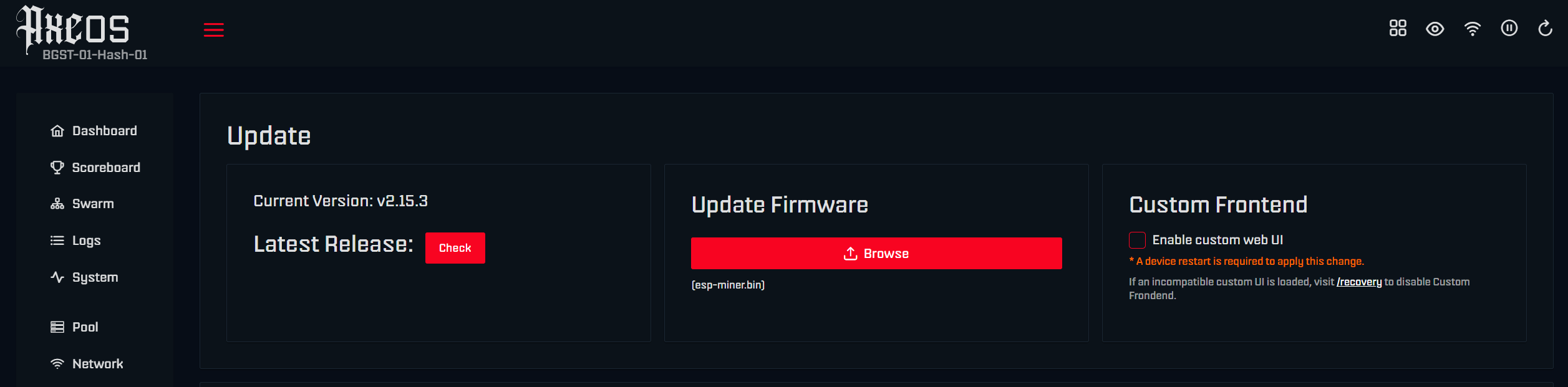
AxeOS v2.15.3: installed version on the left, the esp-miner.bin firmware upload in the middle, and the unchecked “Enable custom web UI” option on the right.
AxeOS v2.15.3: installed version on the left, the esp-miner.bin firmware upload in the middle, and the unchecked “Enable custom web UI” option on the right. Open the full-size screenshot ↗

The web interface is already included

Older guides list the firmware and web interface separately. Since v2.15.0, AxeOS is built into esp-miner.bin, so a standard update no longer needs an additional www.bin upload. One less upload and a little less file juggling. A welcome bit of simplicity in the RastaHash garden.

Official source ↗

Choose the appropriate file

Use the official ESP-Miner releases and follow the instructions for your device and update method. A factory image intended to reset the miner differs from a regular firmware update. A filename ending in .bin does not automatically make it the right choice for your next click.

Official source ↗

Refresh the dashboard afterwards

The developers explicitly recommend refreshing the dashboard after updating the firmware. This guide covers an existing change introduced with v2.15.0, rather than a new release today.

Official source ↗

When www.bin still matters

An enabled custom web interface can still use a separate www.bin and override the embedded interface. Rolling back to older firmware may also require a matching web image. Follow the project documentation for these special cases.

Official source ↗

RASTAHASH / BITAXE / RATGEBER

Bitaxe Update ohne www.bin und ohne Stress

Irie, Hash-Familie! Du willst deinen Bitaxe aktualisieren und suchst die zweite Datei? Seit ESP-Miner v2.15.0 kommt AxeOS beim normalen Update direkt mit der Firmware.

AxeOS v2.15.3: links die installierte Version, in der Mitte der Firmware-Upload für esp-miner.bin, rechts die hier deaktivierte Option „Enable custom web UI“.
AxeOS v2.15.3: links die installierte Version, in der Mitte der Firmware-Upload für esp-miner.bin, rechts die hier deaktivierte Option „Enable custom web UI“. Screenshot in voller Größe öffnen ↗

Die Weboberfläche ist schon dabei

Ältere Anleitungen führen Firmware und Weboberfläche getrennt auf. Seit v2.15.0 steckt AxeOS direkt in esp-miner.bin. Für das normale Update brauchst du deshalb keine zusätzliche www.bin mehr. Ein Upload weniger, ein bisschen weniger Dateijonglage. Genau so mögen wir das im RastaHash-Garten.

Offizielle Quelle ↗

Die passende Datei wählen

Nutze die offiziellen ESP-Miner-Releases und beachte die Hinweise für dein Gerät und den vorgesehenen Updateweg. Ein Factory-Image zum Zurücksetzen ist etwas anderes als ein gewöhnliches Firmware-Update. Nur weil eine Datei auf .bin endet, ist sie noch nicht die richtige für deinen nächsten Klick.

Offizielle Quelle ↗

Das Dashboard danach neu laden

Nach dem Firmware-Update empfehlen die Entwickler ausdrücklich, das Dashboard neu zu laden. Die Neuerung stammt aus v2.15.0 und ist keine Veröffentlichung von heute.

Offizielle Quelle ↗

Wann www.bin weiterhin gebraucht wird

Eine aktivierte eigene Weboberfläche kann weiterhin eine separate www.bin verwenden und die eingebettete Oberfläche überlagern. Auch beim Rückweg zu älterer Firmware kann eine passende separate Webdatei nötig werden. Für diese Sonderfälle gilt die Projektdokumentation.

Offizielle Quelle ↗